Triton Print: Redesigning the Campus Print Center
Reducing wait times and staff burden at UCSD’s print service through a self-service app and live order status display.
Role
UX Researcher & Designer, Project Lead
— led user interviews, actor/user categorization, & sequence modeling; facilitated team meetings, tracked decisions, delegated tasks
Skills
Cognitive ethnography
Contextual inquiry
Affinity mapping
Sequence modeling Wireframing
Prototyping
Tools
Figma (final screen designs)
FigJam (diagramming)
condens.io (interview analysis)
Google Docs/Sheets (meeting minutes, task tracker)
Team project, COGS 102C: Cognitive Design Studio
Overview
Problem. Ordering from Triton Print at The Bookstore @ UCSD depends almost entirely on email and in-person conversations.
The opportunity. Most of the friction came from missing information, not slow printing.
Customers can't easily find what services are offered, how to place an order, or whether their order is ready — so they email, wait, and then line up at the counter to ask. Understaffed employees juggle printing, packing, payments, and answering the same questions on repeat.
Making order options and order status visible — without requiring a staff member — could serve customers faster & free up staff during peak hours. The counter already had a large, underused digital screen we could repurpose.
The solution. We proposed a two part system offsetting the load on staff members and streamlining the ordering experience.
A mobile app for browsing print options, placing orders with upfront pricing, paying, and tracking status in real time.
A repurposed kiosk display at the counter showing live order/pickup status and first-time ordering instructions replacing the cluttered, hard-to-scan signage.
Research & User Testing
Field observation (cognitive ethnography). We observed real customer behavior at the bookstore, categorizing actors by goal: scheduled pickups, targeted shoppers, browsers, and social groups.
This grounded our understanding of how people navigate the space and what cognitive resources they rely on.
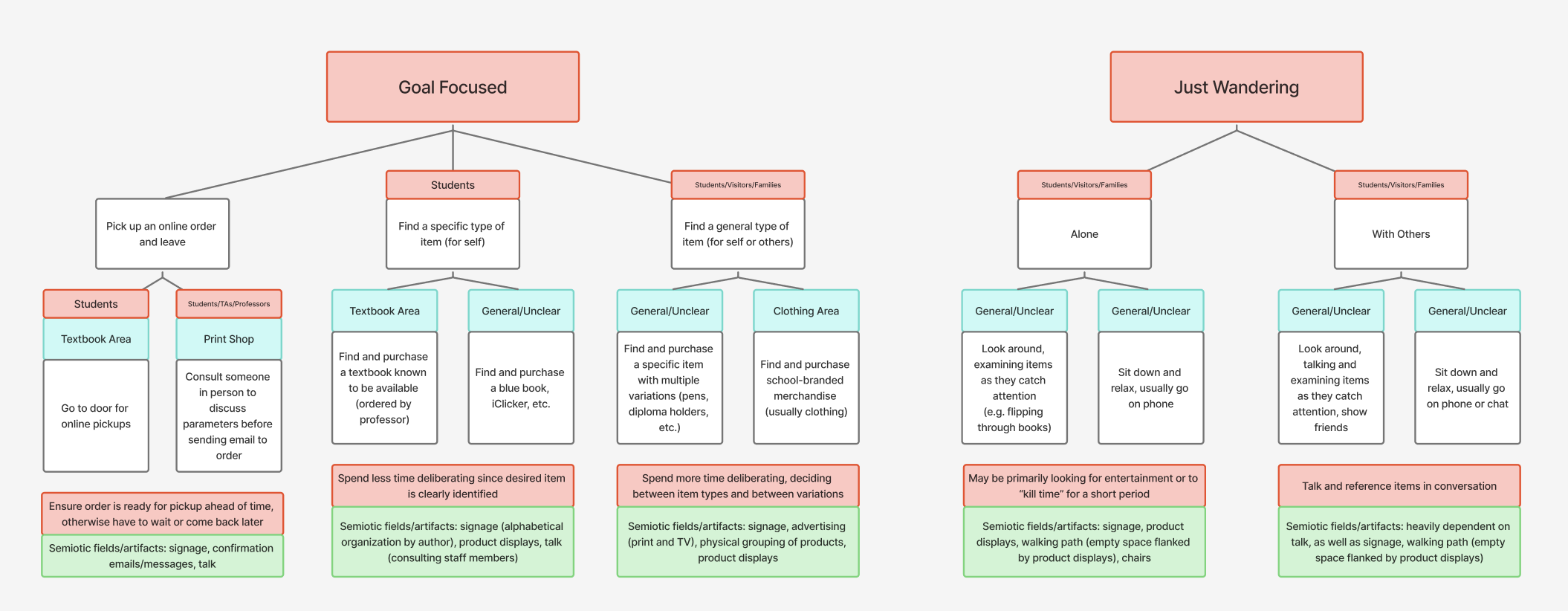
Contextual interviews. We conducted four contextual inquiry interviews with customers at the bookstore, and one in-depth interview with a Triton Print staff member.
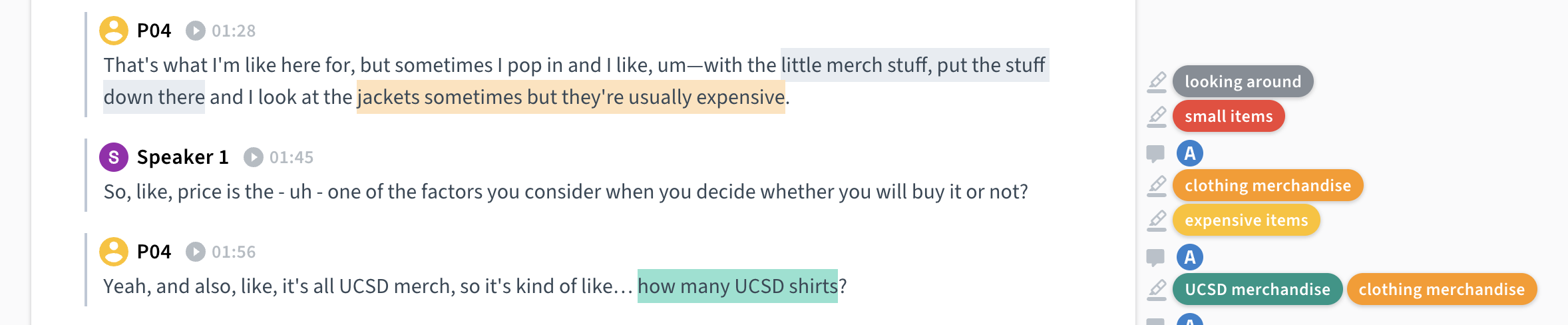
We tagged and affinity mapped every clip collaboratively to see what patterns emerged.
Platform Choice
Testers questioned whether a mobile app was the right choice, or whether a responsive website would lower the barrier to entry — students may hesitate to install an app they only use occasionally.
A sample annotated clip.
Key insights from customers
Users didn't know how to place an order and were told to ask via email. With no response, they were unsure whether it went through or where to pick it up.
Order status was invisible. One participant returned to the counter in person the next day just to ask if their order was done.
Key insights from staff
The printing process is fast, but lines build up because staff simultaneously identify, confirm, pack, and take payment for each pickup while guiding new customers on the ordering process, and the counter is understaffed.
The most common inquiry, through call, email, and in person inquiries, was "is my order ready?"
Recurring bulk orders (e.g., VIS 41 poster prints) created predictable rushes staff had to manage manually.
These insights accumulated into our problem statement: Customers lack accessible information about how to order and cannot track their order status; staff absorb that information gap through email on top of production work.
Prototype testing & feedback.
We shared the Figma prototype with two other design groups during informal testing and critique sessions, and gained three main insights.
Asynchronous pickup
Paying online and picking up without a staff member being present was flagged as one of the most valuable improvements.
Progress visibility
Testers suggested an interactive, e-commerce-style tracking screen showing live updates as an order moves through each stage.
This feedback validated our core direction (self-service, status transparency) while surfacing the app-vs-web question as an open design decision to resolve in a next iteration.
Outcomes & Reflections
Deliverables. We created a high-fidelity Figma prototype covering the mobile app user flow (ordering, payment, real-time tracking) and the kiosk UI, plus a redesigned service procedure and sequence model.
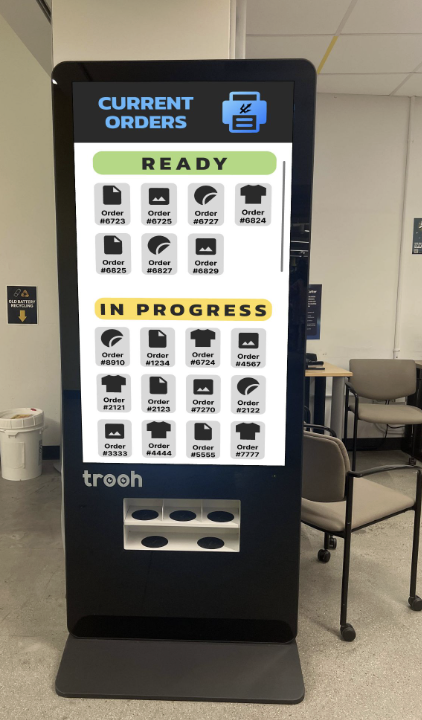
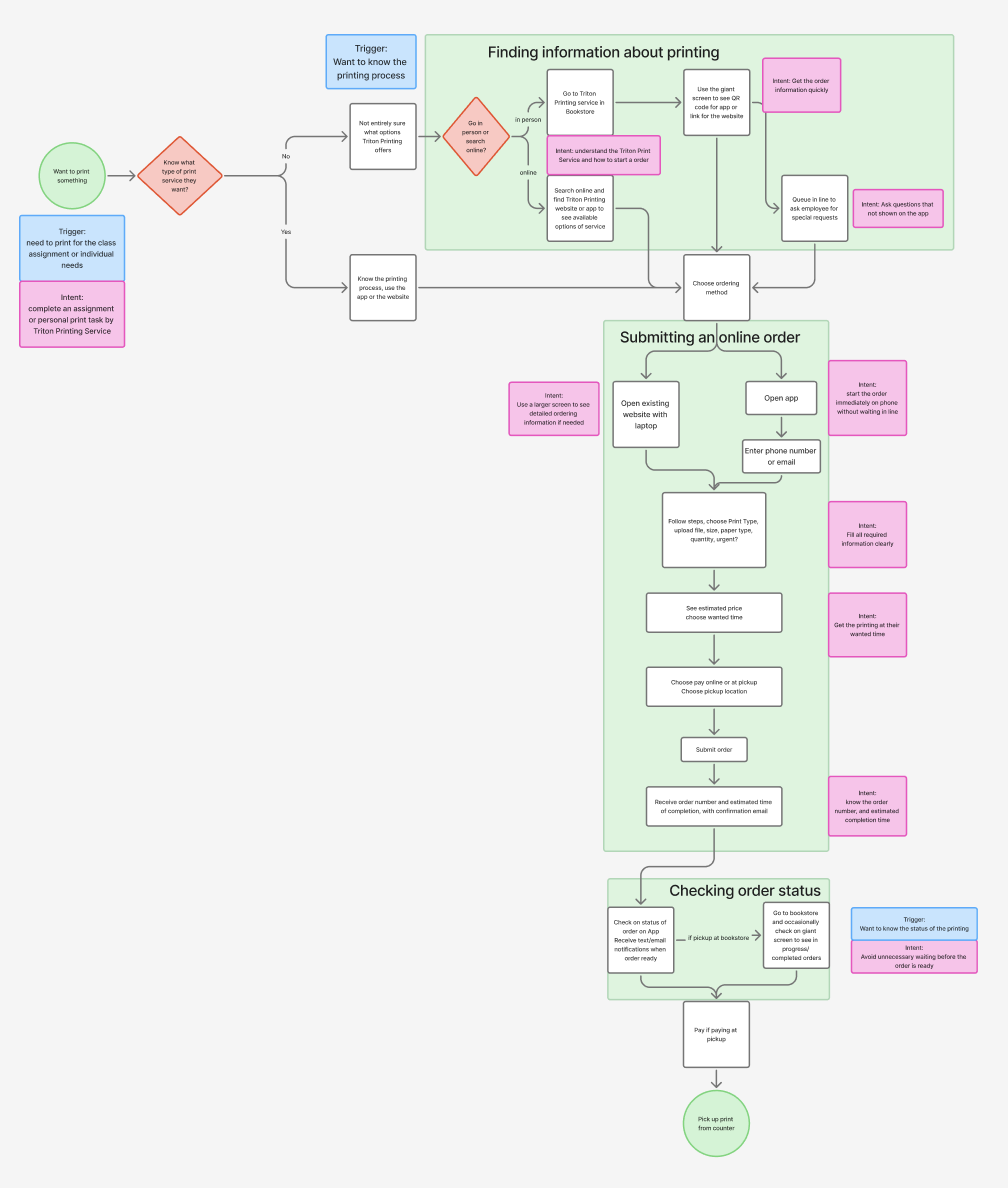
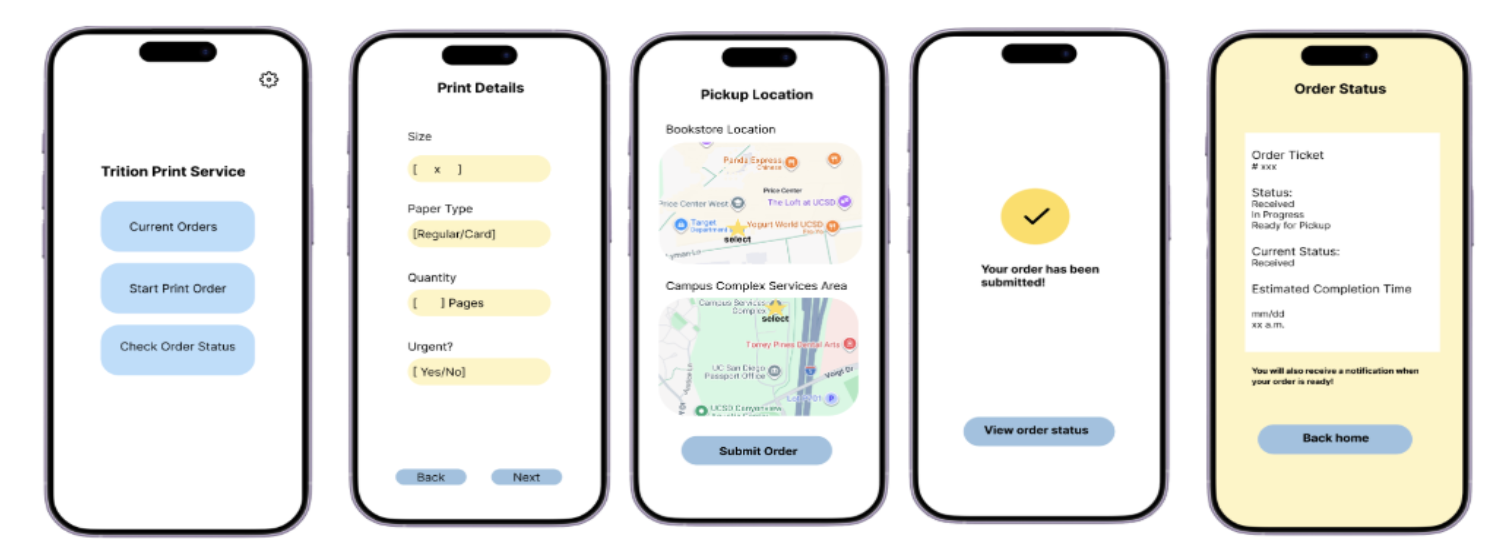
Projected impact. Based on our sequence model, our redesigns streamline the ordering experience and reduce cognitive burden on staff members.
Cut the customer journey from ~9 touchpoints to 4, and required trips to the counter from 2 to 1 (only requiring customers to pick up their order)
Reduce order placement from a multi-day email thread to a single ~3-minute in-app session
Eliminate all 3 "blind waiting" periods by replacing delayed email notifications with real-time status tracking
Remove 3 of the 4 most common counter interruptions (how-to questions, status checks, order confirmation) from staff workload — leaving only the pickup handoff
Move payment off the counter entirely, shortening each pickup interaction
Impacts of the redesign:
No waiting in line just to ask a question
No multi-day email threads to place an order
Instant price visibility before ordering
Real-time order tracking without visiting the bookstore
Reduced staff interruptions during peak hours
BeforePrint counter staff
AfterApp + kiosk
Reflections & next steps.
Cognitive ethnography methods surfaced problems we would never have found through interviews alone — especially the invisible load on staff.
Talking to the service provider, not just customers, reframed the problem from "confusing UI" to "information system failure."
Next steps: resolve the app-vs-responsive-website question raised in peer testing, design the physical handoff for fully staff-free pickup (e.g., numbered shelves or lockers), build out the e-commerce-style order progress tracker, run structured usability tests with first-time customers, and build a staff-side companion app to receive orders (currently, they manually transfer between email and spreadsheet).